


Square Team
4.81.63K Reviews
App Specs
- Version
- 7.22
- Updated On
- License
- Free
- Downloads
- 1,000,000+
- Developer
- Block, Inc.
- Categories
- Finance
- Platform
- Android, iOS
Screenshots
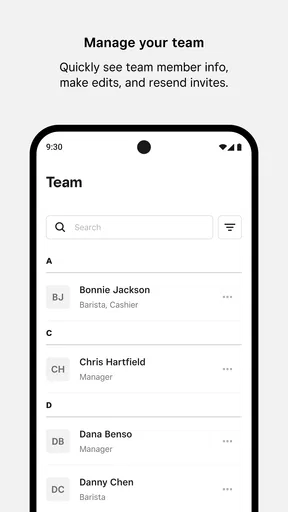
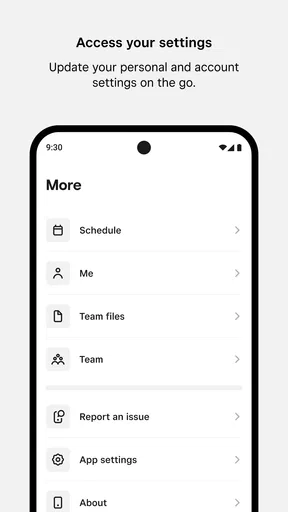
 Analysis by AppCompare
When a workplace runs on changing shifts, quick messages, and hourly earnings, a normal personal finance app is not quite enough. Square Team is built for that narrower but important job: it gives employees a mobile place to communicate, follow schedules, and keep an eye on earnings while away from a computer. I reviewed it as a finance app rather than as a general chat tool, and that distinction matters. Its usefulness depends heavily on whether your employer uses Square’s team-management setup.
The app comes from Block, Inc., and it is free to install. That makes trying it straightforward, but “free” should be understood as free access to the app itself, not as a promise that every workplace feature or payroll arrangement is available independently. The practical value comes from the connection between the employee, the workplace, and the employer’s Square workflow. Without that connection, there is little reason for a person to keep it on a phone.
How Square Team fits into an employee’s day
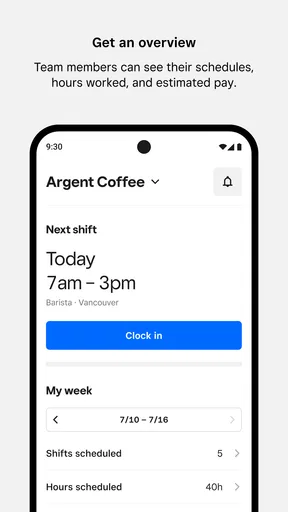
The clearest way to understand it is to imagine a part-time employee getting ready for a busy week. Instead of checking a paper rota, searching through scattered messages, or waiting to use a back-office computer, the employee opens the app to review work-related information on the go. A schedule change can be easier to notice in the same place where workplace communication happens, while earnings information gives a more immediate view of what work has produced.
That combination is more useful than it may sound. Scheduling, communication, and earnings are often treated as separate tasks, yet employees experience them as one routine: when am I working, what has changed, and what have I earned? Square Team brings those questions into one employee-facing experience. I found that its strongest quality is not any single screen, but the reduction in small bits of workplace friction.
It is also important not to confuse this app with a full personal budgeting service. It is not the kind of tool I would choose to track rent, subscriptions, savings goals, investments, or spending categories. Its finance role is tied to employment and earnings. That focused purpose is a strength for hourly workers, but it also defines the audience very clearly.
What the free download actually means
Square Team is listed as free, so there is no purchase decision at the point of installation. For an employee deciding whether to try it, that is a meaningful advantage: there is no paid upgrade to weigh before seeing whether the workplace workflow is useful. The app is also rated for Everyone, which makes its presentation broadly approachable rather than aimed at a specialist financial audience.
Still, the absence of an app price does not mean the app works as a standalone service for everyone. Its purpose is connected to an employer’s use of Square tools. In practical terms, I would first ask whether my workplace expects employees to use Square Team and whether my employee access has been set up correctly. If the answer is no, installing it is unlikely to create useful financial information by itself.
Worth Reading Before You Choose

EA SPORTS FC Mobile 26 Is a Bigger Football Game, but It Takes Time

Flipboard Shows What News Apps Must Do Beyond the Feed

Switching to Android Auto Means Rethinking Your Driving Routine

Google Calendar Makes a Crowded Week Easier to Manage

Ludo King Makes the Most of the Minutes Between Plans

Baby Panda World Brings Quick Play to Modern Phones, but Its Game Library Feels Busy
This is an important value distinction. The app does not need to replace a paid scheduling system or a separate workplace messenger in your personal budget, because an employee normally is not the person purchasing the employer’s system. The value you receive is convenience: less time spent looking for shift details, fewer questions about routine updates, and easier access to work-related earnings information. That is valuable when it solves a real workplace problem, but it is not a reason to download the app merely because it is free.
Where the app earns its place
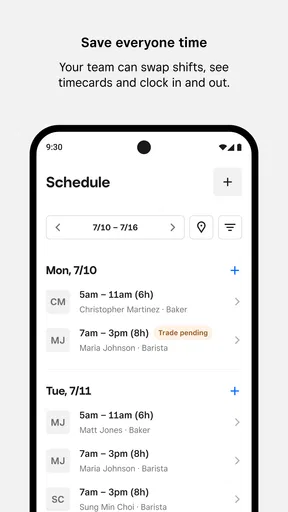
The best use case is a worker whose schedule changes often or whose shifts are spread across a busy workplace. A restaurant employee, retail worker, or service employee may need to check a shift before leaving home, notice a message during the day, and review earnings later. Having those tasks available from a phone can be more practical than relying on a noticeboard or asking a manager to repeat information.
I also see value for people who work irregular hours alongside school, family responsibilities, or another job. In that situation, schedule visibility is not a luxury. It helps with planning transport, childcare, study time, and other commitments. The earnings view adds another useful checkpoint: rather than treating pay as a surprise at the end of a pay period, an employee can use available information to stay more aware of work completed.
One non-obvious benefit is the way the app can reduce the cost of small misunderstandings. If a worker and manager are looking at the same workplace information, there is less dependence on an employee remembering a verbal conversation perfectly. That does not eliminate the need to ask questions, but it gives the conversation a clearer starting point. For busy teams, that shared reference can matter more than a flashy interface.
A realistic shift-planning example
Imagine I am scheduled for several short shifts during a week, with one evening that may have changed. Before commuting, I open Square Team and check the current schedule rather than relying on memory. If a workplace message explains an adjustment, I can read it in the same general workflow instead of searching through personal messages. After working, I can return to the app to review the earnings information available to me.
The useful part is the sequence. I am not using one app to plan my week, another to find a manager’s message, and a third to make sense of work-related pay. Square Team does not turn that routine into a complete financial plan, but it can make the employee side of a workplace more organized. For someone with predictable hours and a well-maintained schedule, the benefit may be modest. For someone whose shifts move around, it can become a regular habit.
What I liked, and where the tradeoffs appear
I like that Square Team can help employees keep work information separate from personal chats, but that convenience comes with a real tradeoff: its usefulness depends on the employer keeping the shared workflow current. I’d treat it as a practical reference, not a substitute for clarifying an urgent schedule conflict or setting boundaries around after-hours notifications. That balance is worth keeping in mind when judging where the app helps—and where its limits show.
The strongest advantage is context
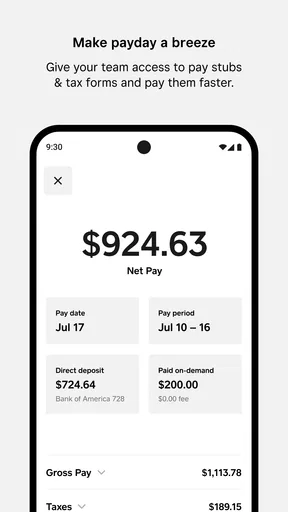
Many finance apps show numbers without explaining their connection to daily work. Square Team approaches earnings in the opposite direction: the financial information sits beside the employee activities that help produce it. That context makes the app easier to understand for a worker who does not want a complicated money dashboard.
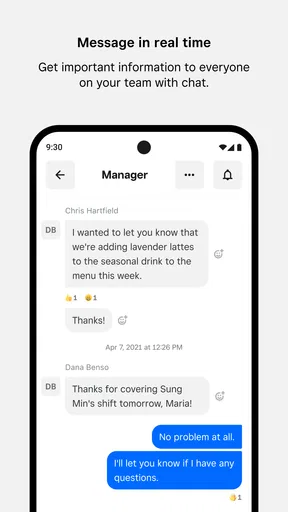
The same applies to communication. A general messaging app may be familiar, but workplace details can disappear among family chats, group conversations, and notifications. A dedicated team app gives work information a more obvious home. In my experience, that separation is especially helpful for people who want to keep employment matters distinct from personal conversations.
Another practical strength is mobility. The store summary emphasizes communicating, managing schedules, and accessing earnings while on the go, and that is the right description of its role. The app is most convincing when I imagine using it between errands, before a shift, or away from a workplace terminal. It is less about deep financial analysis and more about making essential employee information reachable.
The main limitation is dependence on workplace setup
The biggest tradeoff is that the app’s usefulness is not entirely under the employee’s control. A worker can install it, but the quality of the experience depends on how the employer manages schedules, communication, and earnings information through Square. If workplace details are entered late or changes are communicated elsewhere, the app cannot fully solve that organizational problem.
That means I would not treat the app as the sole authority for urgent matters without using sensible judgment. If a shift seems inconsistent with a direct instruction from a manager, I would confirm the situation rather than assuming that one screen settles everything. The app can centralize information, but centralization only helps when the workplace keeps it current.
There is also a focus limitation. Employees looking for budgeting tools, bank-account aggregation, bill reminders, credit monitoring, or long-term financial planning will need another product. Square Team’s finance usefulness is narrow and employment-related. Choosing it as a replacement for a personal money manager would lead to disappointment.
How it compares with familiar alternatives
Compared with a paper schedule, Square Team is more convenient for workers who need updates away from the workplace. A paper rota can be easy to glance at, but it does not travel well and can become outdated when changes are made. The app’s advantage is not that digital information is automatically better; it is that an employee can return to a central mobile reference instead of carrying a photograph or relying on memory.
Compared with ordinary email or group messaging, the app offers a more work-specific destination. Email can preserve a useful record, but schedule details and earnings information may be separated across threads. A general chat service can be fast, yet it mixes work with everything else. Square Team is more focused, which I prefer when the goal is to find employment information quickly rather than maintain a broad conversation.
Compared with a full personal finance app, the difference is even sharper. Budgeting applications are better for understanding household spending and planning future money decisions. Square Team is better for the employee who wants workplace communication, schedules, and earnings in one place. I would use the two categories together if necessary, not expect one to replace the other.
Small habits that make it more useful
My first recommendation is to make checking the schedule part of the routine before leaving for work, especially when shifts change frequently. That simple habit is more reliable than checking only after a colleague mentions an update. It also gives enough time to resolve a discrepancy before travel becomes urgent.
Second, I would use the earnings view as a review tool rather than as a complete pay record in my head. Compare what the app shows with your own work notes or pay information when something looks unusual. This is not because the app is inherently unreliable; it is because employees benefit from noticing discrepancies early, while the details of a shift are still easy to remember.
Third, I would keep workplace communication disciplined. Important questions should be written clearly, with the relevant shift or date included, rather than buried in a vague message. A dedicated team channel is most valuable when employees and managers use it consistently. The app can make information easier to find, but clear habits make the information easier to act on.
A fourth insight is about boundaries. Because the app brings work information onto a personal phone, I would decide when I am willing to check it and avoid treating every notification as an emergency. The convenience of mobile access can quietly become pressure to remain available. Its best use is controlled access to work details, not an invitation to let work occupy every spare moment.
Who should use it, and who should skip it
I would recommend Square Team to employees whose employer already uses the relevant Square workflow and who want a simple mobile connection to schedules, team communication, and earnings. It is particularly suitable for hourly or shift-based workers who often need information outside a desk environment. The app’s broad age rating and free access also make the initial trial uncomplicated for eligible employees.
I would be more cautious if my workplace rarely updates its digital schedule, communicates almost entirely through another channel, or gives employees no meaningful access to earnings information through the app. In that situation, the installation may add another place to check without removing the old confusion. The right solution might be a clearer employer process rather than another application.
I would skip it if I wanted an independent financial planner. Someone comparing budgeting apps, expense trackers, or investment tools should look elsewhere because those products address different needs. I would also skip it if I had no connection to a workplace using Square Team; the app’s value is relational, not something I can unlock through personal use alone.
Compatibility and overall polish
The current version is 7.21, and the app supports operating system version 9 or later. That gives people with reasonably current Android or iOS devices a clear compatibility check before installing. I appreciate having that practical detail available because workplace apps are often installed on older personal phones, and compatibility can be more important than a long feature list.
Its reception is strong, with an average rating of 4.8 from around eight and a half thousand ratings, alongside more than a thousand written reviews. The app has also passed the million-install mark. Those figures suggest that it has found a real audience, although they do not guarantee that every employee will have the same experience. Workplace configuration remains the deciding factor.
For me, the most telling measure is whether the app removes repeated questions from the workday. If it lets me find a schedule, understand a workplace message, and check available earnings without switching between unrelated tools, it has done its job. If my employer’s process is already fragmented, the app may expose that weakness rather than hide it.
My final recommendation
Square Team is a focused, free finance and employee-management app with a clear audience. I like it because it treats earnings as part of the working day rather than as an isolated financial number. The schedule and communication functions give that information practical context, and mobile access is genuinely helpful for people who work changing shifts.
Its limitations are equally clear. It is not a personal budgeting suite, it cannot repair poor workplace communication on its own, and its usefulness depends on employer adoption and maintenance. Those are not minor details; they determine whether the app feels like a central work companion or simply another icon on a phone.
My verdict is to install it when your employer uses Square Team and you need a convenient way to follow work information away from the workplace. The free entry point makes trying it sensible, and the strongest value comes from combining schedule awareness with earnings visibility. If you are searching for independent money management, choose a dedicated finance alternative instead. For the right employee, however, the real value is less searching, less uncertainty, and better control over the practical details of each shift.
Pros
- Simple team messaging keeps workplace conversations organized.
- Task assignments help clarify responsibilities and deadlines.
- Shared files make important documents easy for teams to access.
- Useful for coordinating schedules
- updates
- and daily operations.
- Clean interface is approachable for users with limited technical experience.
Cons
- Some advanced collaboration tools may require a paid subscription.
- Notifications can become distracting in busy team conversations.
- Limited customization may not suit complex organizational workflows.
- Requires reliable internet access for real-time communication.
- Smaller teams may find the app unnecessary for basic coordination.
FAQs for Square Team
What is Square Team, and who is it designed for?
Square Team is a staff-management app connected to Square’s business tools. It is designed for employers and team members who need a convenient way to manage schedules, shifts, time tracking, communication, and workplace information. Its usefulness depends on the business using Square, so employees should confirm that their employer has enabled the service before downloading and attempting to sign in.
How do I sign in to Square Team?
To use Square Team, you generally need an invitation or access provided by your employer and the login details associated with your team member profile. The app may require you to verify your email address or phone number and create credentials before you can view workplace information. If your account is not recognized, contact your manager rather than creating a separate personal account.
What can employees do with the Square Team app?
Depending on the features enabled by the employer, Square Team can allow employees to view upcoming shifts, request time off, clock in or out, review timecard information, communicate with coworkers, and access selected workplace resources. Available tools can vary by business settings, employee permissions, location, and Square subscription, so not every user will see exactly the same options.
Does Square Team track my location or attendance?
Square Team may be used by an employer to manage attendance, timecards, and work schedules. Some businesses can configure location-related controls or workplace restrictions for clocking in and out, but the exact behavior depends on the employer’s settings and the device permissions you grant. Before using the app, review its permission requests and ask your employer how attendance data is collected and used.
Is Square Team free, and what should I check before downloading it?
Employees can typically download Square Team without paying an individual subscription fee, although the employer may pay for Square services or enable features under a business plan. You should check that your workplace uses Square, your account has been invited, and your phone meets the app’s requirements. Also review privacy permissions, notification settings, and the app’s data practices before installation.


